

Your daily dose of caffeine for the brain with free refills.
Showing posts with label google. Show all posts
Showing posts with label google. Show all posts
Monday, May 13, 2013

Tuesday, April 30, 2013
Are you using Google Research Tool in Google Drive?
I
have crafted a short video showing the power of the Research Tool within Google
Drive. This is something that needs to be explored more by teachers and
utilized by students. A major time saver and also a key tool when collaborating
and conducting research.
Let
me know how you use this in your classroom. I am looking to make this a staple
in all of my classes from here on out.
I have made a video tutorial with some ideas on how it all works. The link is below.
I have made a video tutorial with some ideas on how it all works. The link is below.
Here’s
how it works!
1.
Go to your Google Docs/Drive page
2.
Choose “Create” and
then select “Document.”
3.
Start by writing your information
whether a research paper, script, debate, etc.
4.
When you get to a word that you need
some guidance and help with or it is a place where more research is needed go
ahead go to the toolbar.
5.
Click on “Tools” and
then find “Research.” You can see below that I highlighted Twitter in my
document and Research already has Twitter researched for me.

6.
You
can click the little down arrows underneath your search box in the Research
panel to select the options you want

Citing the sources
Web Results:
When you have the resource that you want to use you will get three options to choose from. They are Preview, Insert Link, and Cite

Preview will give you a preview box of the website before you click on it to open it up to see if it is worth your time.

Insert Link will take the highlighted text in your document and make it a hyperlink to that site if that is what you need. In image below you see Twitter as a hyperlink.

Cite will then site the article/website for you and make it a footer.

Images
When searching images all you do is drag the picture and it will site it automatically.
What I like best is the option to find images that are not copyrighted!

These are the two major uses I see with the Research tool in Google Drive. Don't forget you have many more options within this tool

As stated above I would love to connect with fellow educators who are using this tool to see examples of it in action and to enhance my own knowledge. I think it would be foolish to not use this if your school has Google Drive.
I would love to hear from others who use this, how they use this tool, and any other advice, tips, or ideas.
I would love to hear from others who use this, how they use this tool, and any other advice, tips, or ideas.

Monday, April 29, 2013
Why are you not using Google Voice Comments App?
I recently have fallen in love with Google Voice. This new tool(or at least new to me) allows you to record your voice to Google Documents. I love this to give feedback and insight to student work. It allows me to share my thoughts while grading instead of having to type everything up. It allows me to connect with many kids at once when we are collaboratively working on a document. On days I am absent I can leave my voice to give them direction and tips.
It is a great tool and must have to use if using Google Drive.
Here is a little tutorial explaining how it works and how to get started. Let me know what you think.
It is a great tool and must have to use if using Google Drive.
Here is a little tutorial explaining how it works and how to get started. Let me know what you think.
Monday, April 8, 2013
Google Image Search by Color
I am working on some tutorials for my Speed Geek session that I am presenting in a few days. I thought I would share a few here on the blog to get in the routine of explaining some. This one deals with searching for images by color.
Step 1: Go to the advanced search option for Google Images

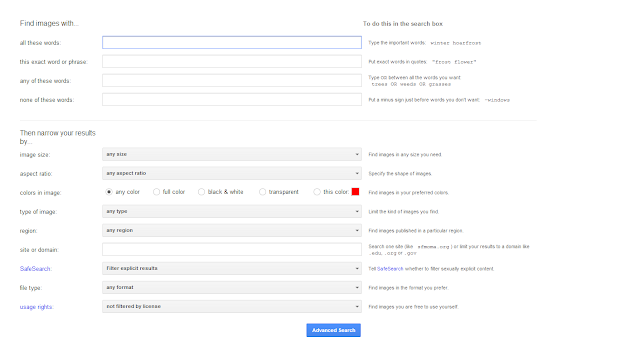

Step 1: Go to the advanced search option for Google Images

Step 2. Once to the advanced page choose the color you want by selecting it in the options. In this case I am searching for blue even though I have not switched it from red yet in this screenshot.

Step 3: Type in your word and you will then have your topic by color choice. So my coffee search with the color blue provides me all I need!

For more information on tools I use in my classroom on a daily basis please check out my wiki page - http://coffeechugclassroomtools.wikispaces.com/home
It is still a work in progress, but will be completed in the next two days. If you have any suggestions or tips please let me know.
Wednesday, April 3, 2013
Google Maps - Pirate Style
I know I am late on this, but how cool is Google Maps with the pirate map theme? I say super cool!

Street View offers a spyglass. j.mp/YqTXos

Monday, March 25, 2013
UPDATE: What Did We Learn This Week Recap, Remix Generation, and Learning
Last night I had a great Google Hangout Chat with two wonderful people that were gracious enough to jump online and chat.
I have started a new Google Hangout Chat called What Did We Learn This Week?
I plan to have a weekly or biweekly meeting where people can jump in the conversation and talk about what they are learning, new books to read, favorite app, etc. It is wide open with goal being that at the end of the conversation we walk away excited about some new ideas to explore.
Before I get into the key idea that I want to address about remixing I wanted to give a list of ideas shared to me online by people who were not able to attend in person
Last night one of the ideas brought to the table was the idea of remixing. Scratch software encourages remixing or taking an idea of someone else and making it your own.
According to the wiki Scratch site a remix is "A remix is a modified and shared version of an uploaded project. Remixes, and all projects, are always under the Creative Commons Attribution-Share Alike License, the license Scratch uses."
We had a great discussion about this whole idea. One did not like it. Another viewed it as the way we are brought up and I stood somewhere in the middle. As I continued to think about it more I realized that I had differing ideas based on what I am teaching.
Today I took my kids to a Family Museum and realized that our essential learning process is a remix. I watched it unfold time and time again so I am all for remixing. I have sided with the idea that it is indeed okay. We still need to teach parameters and how it all works, but the great conversation of last night lead me to more thinking and it all unfolded today.
Let me explain a bit.
First, we were playing music. Basically we took the idea of hitting notes and remixing the same pattern using different elements. It was freedom to create and learn. Maybe not so much remixing in terms of a song already being created, but watching my three kids they constantly remixed what one another was doing and trying to make it better.


Addy observed and look for an opening in which to engage. Addy is my middle child. She wants friends and loves to play with other kids. She approached things different from the other two. She would wait for an opening and then join the action. Once again this is a form of a remix in a sense. She watched to see how she could do what was being done and when she entered the realm of play she would remix things to add her own touch to the game. I saw this when she played in the mail room and the bridge crossing.
Ava copied each kid she watched while playing. She constantly would walk to a station, stop and stare, and then repeat the other kids. Especially the older kids. She watched with such curiosity and studied them so intently. It was cool to see. I can see why kids can learn both good and bad traits.


 Aiden did his own thing and just created and processed on his own, but this lead to other kids copying his ideas after he left. He spent a great deal of time figuring out this tube and water system. He had a scheme in mind. I watched other kids look at what he was doing. As soon as he was done, then they came right up and would copy his style and then branch off to create their own. Aiden was the silent one. Other times he would see a kid doing something that intrigued him. He would not interact, but wait until the coast was clear and then remix the idea that he observed.
We are a remix culture. These examples are not programming or Scratch based. They don't warrant a creative common license, but do showcase the essence of how we learn and continue to learn.
Here is the link to the chat from last night - http://youtu.be/m8NNumOREfI
I plan on having another chat next weekend.
I have started a new Google Hangout Chat called What Did We Learn This Week?
I plan to have a weekly or biweekly meeting where people can jump in the conversation and talk about what they are learning, new books to read, favorite app, etc. It is wide open with goal being that at the end of the conversation we walk away excited about some new ideas to explore.
Before I get into the key idea that I want to address about remixing I wanted to give a list of ideas shared to me online by people who were not able to attend in person
- Sorry I missed it... on the road, but here's a great learning experience for those hard to reach students from Eric Jensen: http://www.ascd.org/Publications/Authors/Eric-Jensen.aspx?id=603899782001
We can make a difference when we understand their needs. 3 key action steps: Embody respect. Embed social skills. Be inclusive. - I heard about "Mystery Skype" and thought it sounded like fun, so I
created a "Mystery Hangout" Community on G+ in hopes of connecting
classrooms around the world through a fun game that's a mix of
Battleships and 20 questions.
Basically, 2 teachers arrange a Hangout and then guess where each other is! Do join and spread the word if it sounds like fun to you. Personally, I want to find a classroom in Spain for my CT students. - I worked on deepening my skills in Illustrator and downloaded Inkscape (freeware similar to Illustrator) to try it out. It has a lot of power but uses very different terminology. It is something I want to explore. It's cross-platform BUT a bit outdated. It works on Snow Leopard (Mac osx) but not Lion or Mountain Lion (the latest 2 OSX). Luckily I have an older Mac still running Snow Leopard!
Last night one of the ideas brought to the table was the idea of remixing. Scratch software encourages remixing or taking an idea of someone else and making it your own.
According to the wiki Scratch site a remix is "A remix is a modified and shared version of an uploaded project. Remixes, and all projects, are always under the Creative Commons Attribution-Share Alike License, the license Scratch uses."
We had a great discussion about this whole idea. One did not like it. Another viewed it as the way we are brought up and I stood somewhere in the middle. As I continued to think about it more I realized that I had differing ideas based on what I am teaching.
Today I took my kids to a Family Museum and realized that our essential learning process is a remix. I watched it unfold time and time again so I am all for remixing. I have sided with the idea that it is indeed okay. We still need to teach parameters and how it all works, but the great conversation of last night lead me to more thinking and it all unfolded today.
Let me explain a bit.
First, we were playing music. Basically we took the idea of hitting notes and remixing the same pattern using different elements. It was freedom to create and learn. Maybe not so much remixing in terms of a song already being created, but watching my three kids they constantly remixed what one another was doing and trying to make it better.


Addy observed and look for an opening in which to engage. Addy is my middle child. She wants friends and loves to play with other kids. She approached things different from the other two. She would wait for an opening and then join the action. Once again this is a form of a remix in a sense. She watched to see how she could do what was being done and when she entered the realm of play she would remix things to add her own touch to the game. I saw this when she played in the mail room and the bridge crossing.


We are a remix culture. These examples are not programming or Scratch based. They don't warrant a creative common license, but do showcase the essence of how we learn and continue to learn.
Here is the link to the chat from last night - http://youtu.be/m8NNumOREfI
I plan on having another chat next weekend.
Monday, March 18, 2013
My 2 ¢ worth about losing Google Reader
The news is old already about Google shutting down Google Reader.
There have been many relevant and much better and more insightful posts about losing this wonderful service like Chris Betcher and Vicki Davis to name a few.
I feel compelled to voice my concerns.
I am mad. I am very frustrated and don't know what action to take next.
I will be honest and tell you that Google and Apple are my two favorite companies. I use them 24/7 all day long for everything. I have valued Google because they offer so many great services that meet the needs of anyone no matter their situation, job, or interests.
Google Reader is the cornerstone of my connective learning. This is my go to place to read and search the people that influence me the most. I use all tools, devices, and sites, but Reader is one that is part of my daily life. I always leave about 30 minutes a day to just relax and sift through my Reader to see what my favorite bloggers, sites, and people have to share.
Can I do this with other sites? Yes, I have to begin to search for new ways and tools to give me the same system I am use to. Will it be better? No!
Here is why......My Google Reader flows seamlessly with my Gmail, my YouTube, My G+, etc. All I have to do is simply click one button and there it is. It syncs with everything. So easy. So simple. All in one place.
Now I have to find another system. Another website. Another tool. And leave another tab open to use. Maybe not a big deal to most, but this is huge for me. I don't want that.
Google Reader is free. Google owns Reader. So, therefore it has complete rights to do whatever. But this leaves a bad taste in my mouth.
They are shutting down iGoogle. I was not happy with that. I was able to move on, but not happy. I could cope because I still had everything in one place. Now this.
Now I begin to wonder if Google is becoming too money hungry. Does it really hurt them enough to just leave it alone and offer it as a service? Really? It makes people happy. Many people use it. At what point do they shut down other services? Do they take away blogger? Maybe not, but how do we know? I never thought Reader would leave.
I feel betrayed. It sounds stupid, but true.
Will I move on? Yes, I have no choice. I am looking at other feeders like Feedly to name one that I will probably move to, but I feel burned. I do. Maybe I am taking it too personal, but you know what..... my Google Reader was personal. It represented who I was and what I wanted to read. It was my escape. It was my life outside of my real life. It connected to my life with triathlon blogs, eating blogs, education sites, jokes, etc. It was an extension of me. That has been taken away and I must adapt. I will. I will move on. But for now I will be bitter until July.
Some other posts about this issue
New Yorker
USA Today
There have been many relevant and much better and more insightful posts about losing this wonderful service like Chris Betcher and Vicki Davis to name a few.
I feel compelled to voice my concerns.
I am mad. I am very frustrated and don't know what action to take next.
I will be honest and tell you that Google and Apple are my two favorite companies. I use them 24/7 all day long for everything. I have valued Google because they offer so many great services that meet the needs of anyone no matter their situation, job, or interests.
Google Reader is the cornerstone of my connective learning. This is my go to place to read and search the people that influence me the most. I use all tools, devices, and sites, but Reader is one that is part of my daily life. I always leave about 30 minutes a day to just relax and sift through my Reader to see what my favorite bloggers, sites, and people have to share.
Can I do this with other sites? Yes, I have to begin to search for new ways and tools to give me the same system I am use to. Will it be better? No!
Here is why......My Google Reader flows seamlessly with my Gmail, my YouTube, My G+, etc. All I have to do is simply click one button and there it is. It syncs with everything. So easy. So simple. All in one place.
Now I have to find another system. Another website. Another tool. And leave another tab open to use. Maybe not a big deal to most, but this is huge for me. I don't want that.
Google Reader is free. Google owns Reader. So, therefore it has complete rights to do whatever. But this leaves a bad taste in my mouth.
They are shutting down iGoogle. I was not happy with that. I was able to move on, but not happy. I could cope because I still had everything in one place. Now this.
Now I begin to wonder if Google is becoming too money hungry. Does it really hurt them enough to just leave it alone and offer it as a service? Really? It makes people happy. Many people use it. At what point do they shut down other services? Do they take away blogger? Maybe not, but how do we know? I never thought Reader would leave.
I feel betrayed. It sounds stupid, but true.
Will I move on? Yes, I have no choice. I am looking at other feeders like Feedly to name one that I will probably move to, but I feel burned. I do. Maybe I am taking it too personal, but you know what..... my Google Reader was personal. It represented who I was and what I wanted to read. It was my escape. It was my life outside of my real life. It connected to my life with triathlon blogs, eating blogs, education sites, jokes, etc. It was an extension of me. That has been taken away and I must adapt. I will. I will move on. But for now I will be bitter until July.
Some other posts about this issue
New Yorker
USA Today
Monday, March 11, 2013
Wednesday, November 21, 2012
NAGC Conference: Game Your Way Into Thinking Notes
This was one of my first sessions of the conference. I was still overwhelmed by how big this conference was and I did not take a lot of notes at this session due to trying to figure everything out.
With that being said this session was very good. I walked away with a few key projects and all of which I have plans to tweak and modify to make my own. All good ideas are always stolen from someone else right?
The name of the presentation was, "Game Your Way to Learning" by Robbi Makely and Dr. Candy McGregor. They were very good presenters.
Here is a link to their site for this presentation: http://nagc.wikispaces.com/
Choose the GAMES option for the session I attended
 The two of them presented several projects. The one project that I really liked was using Google Earth to find strange items on Earth. They have already created everything for you as a teacher. I mean EVERYTHING. The clues, the templates, the FAQ's, the rubric, etc. You don't have to create single thing. I would suggest that you do go and actually go through the items yourself to understand how it works.
This project forces students to do research, analysis, and writing. They have to learn how to conduct research to find an answer. This is very important because how often do we give students the exact place to research. This eliminates spoon feeding our students. It also has a topic of interest as students are eager to find these weird and odd places on earth. Once they have identified the location through the clues and dig around a bit they then have to write about their research. We all know the writing of our youth needs work. This once again will give them practice all the while being on a topic of interest.
This session has intrigued my interest. I have begun exploring Google Earth and searching for blog and websites that have found weird places on earth. I plan on using this activity in my classroom starting after Thanksgiving Break. Over break I will be creating my own little system using all the wonderful resources that have been created. It is going to be awesome. I will be delivering one a week to break up the larger projects that we are working on. It will be good to still work on key skills, but mixing things up from the bigger tasks at hand. I will be sharing my project here on the blog once I have it up and running.
Here is one blog I found that had some cool images from earth: http://www.docmercury.com/ge/
Here is one more: Map Of Strange
If you know of others please let me know as I am searching far and wide to find more sources.
Last, I am slowly working on posting my notes and thoughts from all sessions I attended. Give me time as I filled an entire notepad full. I was in education nerd heaven!
Off to create a theme to my Google Earth Project Game..........
With that being said this session was very good. I walked away with a few key projects and all of which I have plans to tweak and modify to make my own. All good ideas are always stolen from someone else right?
The name of the presentation was, "Game Your Way to Learning" by Robbi Makely and Dr. Candy McGregor. They were very good presenters.
Here is a link to their site for this presentation: http://nagc.wikispaces.com/
Choose the GAMES option for the session I attended

This project forces students to do research, analysis, and writing. They have to learn how to conduct research to find an answer. This is very important because how often do we give students the exact place to research. This eliminates spoon feeding our students. It also has a topic of interest as students are eager to find these weird and odd places on earth. Once they have identified the location through the clues and dig around a bit they then have to write about their research. We all know the writing of our youth needs work. This once again will give them practice all the while being on a topic of interest.
This session has intrigued my interest. I have begun exploring Google Earth and searching for blog and websites that have found weird places on earth. I plan on using this activity in my classroom starting after Thanksgiving Break. Over break I will be creating my own little system using all the wonderful resources that have been created. It is going to be awesome. I will be delivering one a week to break up the larger projects that we are working on. It will be good to still work on key skills, but mixing things up from the bigger tasks at hand. I will be sharing my project here on the blog once I have it up and running.
Here is one blog I found that had some cool images from earth: http://www.docmercury.com/ge/
Here is one more: Map Of Strange
If you know of others please let me know as I am searching far and wide to find more sources.
Last, I am slowly working on posting my notes and thoughts from all sessions I attended. Give me time as I filled an entire notepad full. I was in education nerd heaven!
Off to create a theme to my Google Earth Project Game..........
Subscribe to:
Posts (Atom)